The Observer Pattern Unlocked: From React Context to Node.js Graceful Shutdowns
The Observer Pattern is a behavioral design pattern that defines a one-to-many dependency between objects. Its primary purpose is to ensure that when one object (the Subject) changes its state, all its dependents (the Observers) are notified and updated automatically.
Published on 27 feb 2026
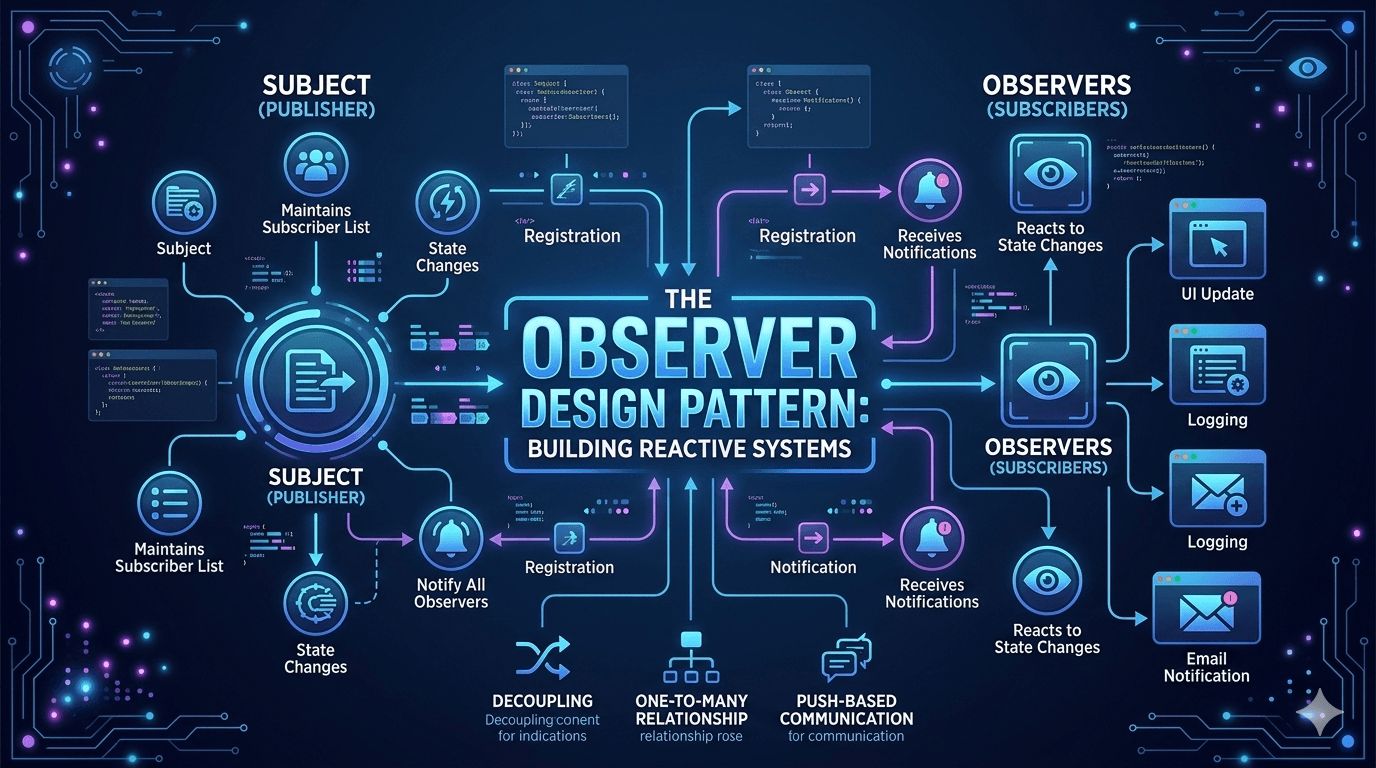
The Observer Design Pattern is like a subscription service for your code. It’s a behavioral pattern used when you want multiple objects (the "Observers") to stay updated whenever another object (the "Subject") changes state.
Think of it like a YouTube Channel: The channel (Subject) doesn't care what you do all day, but as soon as they upload a video, all the subscribers (Observers) get a notification automatically.
1. How It Works
The pattern relies on two primary components:
-
The Subject (Publisher): Maintains a list of observers and provides methods to attach or detach them. When its state changes, it "broadcasts" a notification to everyone on the list.
-
The Observers (Subscribers): Objects that implement an interface with an update() method. They wait to be told that something has happened.
2. The Basic Workflow
-
Register: The Observer tells the Subject, "Hey, keep me in the loop."
-
Notify: The Subject's state changes. It loops through its list of Observers and calls their update() function.
-
Unregister: The Observer says, "I'm done," and is removed from the list.
3. When Should You Use the Observer Pattern?
-
Decoupling: When you want one object to trigger actions in others without knowing exactly who those objects are or how many there are.
-
Event Handling: It’s the backbone of almost every GUI framework (e.g., clicking a button triggers listeners).
-
One-to-Many Dependencies: When a change in one object requires changing others, and you don't know how many objects need to change.
4. The Implementation
Here is a clean, modern ES6 implementation of a Subject (the Publisher) and an Observer (the Subscriber).
// 1. The Subject: The source of truth
class WeatherStation {
  constructor() {
    this.subscribers = []; // List of observers
    this.temp = 0;
  }

  // Add a subscriber
  subscribe(observer) {
    this.subscribers.push(observer);
  }

  // Remove a subscriber
  unsubscribe(observer) {
    this.subscribers = this.subscribers.filter((sub) => sub !== observer);
  }

  // The "Broadcast" - tell everyone what happened
  notify() {
    this.subscribers.forEach((sub) => sub.update(this.temp));
  }

  // Change state and trigger notification
  setTemperature(newTemp) {
    console.log(`WeatherStation: New temp is ${newTemp}°C`);
    this.temp = newTemp;
    this.notify();
  }
}

// 2. The Observer: The interested party
class PhoneDisplay {
  constructor(name) {
    this.name = name;
  }

  update(temp) {
    console.log(`${this.name} display updated: It is now ${temp}°C`);
  }
}

// --- Usage ---

const station = new WeatherStation();

const iphone = new PhoneDisplay('iPhone 15');
const android = new PhoneDisplay('Pixel 8');

station.subscribe(iphone);
station.subscribe(android);

// This will trigger updates for both phones
station.setTemperature(25);

// If the iPhone unsubscribes...
station.unsubscribe(iphone);

// Only the Android will get this update
station.setTemperature(30);
4.1 Why this works well in JS
-
Loose Coupling: The WeatherStation doesn't need to know how PhoneDisplay works. It just needs to know that PhoneDisplay has an update() method.
-
Dynamic Relationships: You can add or remove subscribers at runtime based on user interaction (e.g., closing a tab or clicking a "mute" button).
-
Memory Management: Note the unsubscribe method. In real-world apps (like React), failing to unsubscribe when a component unmounts can lead to "ghost" observers that eat up memory.
In Node.js, the Observer Pattern is baked directly into the core through the EventEmitter class. It is the architectural foundation of Node.js—nearly everything, from HTTP servers to file streams, inherits from it.
In this environment, the Subject is an instance of EventEmitter, and the Observers are the callback functions attached via .on().
4.2 Observer Pattern in Node.js (EventEmitter)
Here is an example of a Stock Ticker. The Ticker (Subject) emits events whenever a stock price changes, and different services (Observers) listen for those specific updates.
const EventEmitter = require('events');

// 1. The Subject: Inheriting from EventEmitter
class StockTicker extends EventEmitter {
  constructor(symbol) {
    super();
    this.symbol = symbol;
    this.price = 100;
  }

  // Method to simulate a price change
  updatePrice(newPrice) {
    const oldPrice = this.price;
    this.price = newPrice;

    // The "Notify" step: Emit an event with data
    this.emit('priceUpdate', {
      symbol: this.symbol,
      oldPrice: oldPrice,
      newPrice: newPrice,
      change: newPrice - oldPrice,
    });
  }
}

// 2. The Observers: Functions listening for the event
const googleTicker = new StockTicker('GOOGL');

// Observer A: A UI Logger
googleTicker.on('priceUpdate', (data) => {
  console.log(
    `[Display] ${data.symbol}: $${data.newPrice} (${data.change > 0 ? '+' : ''}${data.change})`,
  );
});

// Observer B: An Alert System (Only cares about big drops)
const alertSystem = (data) => {
  if (data.change < -5) {
    console.error(`!!! ALERT: ${data.symbol} dropped significantly!`);
  }
};

googleTicker.on('priceUpdate', alertSystem);

// --- Simulation ---
googleTicker.updatePrice(105); // Normal update
googleTicker.updatePrice(98); // Triggers the alert system too

// 3. Unsubscribe (Cleanup)
googleTicker.removeListener('priceUpdate', alertSystem);
Key Node.js Concepts to Know
emit vs on
-
.on(eventName, listener): This registers the observer. You can attach multiple listeners to the same event name.
-
.emit(eventName, data): This is the broadcast. It calls all registered listeners synchronously in the order they were added.
once()
Node provides a special method called .once(). This is an observer that automatically "unsubscribes" itself after the first time the event is fired. This is perfect for one-time setup events or error handling.
How it Works
events.once(emitter, eventName) returns a Promise that:
-
Resolves when the specific event is emitted.
-
Rejects immediately if the emitter emits an 'error' while waiting.
Synchronous Execution
By default, EventEmitter treats all observers synchronously. If one observer crashes or contains a heavy computation, it will block the subsequent observers from receiving the notification.
Important: Because EventEmitter listeners run synchronously, a slow or blocking observer can delay all other listeners. In high-throughput systems, consider offloading heavy work using setImmediate(), queues, or worker threads.
The error Event
In Node.js, the error event is a "special" observer pattern. If an EventEmitter emits an 'error' and there are no observers (listeners) registered for it, the Node.js process will crash. Always attach an error observer:
myTicker.on('error', (err) => {
  console.error('Something went wrong:', err);
});
5. Error Events
In Node.js, the 'error' event isn't just a naming convention; it is a hardcoded safety mechanism within the EventEmitter class. While other events like 'data' or 'update' can be emitted and ignored without consequence, the 'error' event demands an observer.
5.1 Why does Node.js crash?
Node.js follows a "fail-fast" philosophy. If something goes wrong (an error is emitted) and your code doesn't have a plan to handle it (no listener), Node assumes the application is in an unstable, unpredictable state. To prevent further data corruption or silent failures, it throws an unhandled exception.
The Mechanics of the Crash
When you call emitter.emit('error', new Error('Oops')), the internal logic of EventEmitter checks if the 'error' event has any listeners:
-
If listeners exist: They are called, and execution continues.
-
If NO listeners exist: Node.js prints the stack trace to stderr and exits the process with exit code 1.
5.2 Standard Pattern: The "Safety Net"
To prevent crashes, you must always register a listener. This is the Observer Pattern acting as a guardian.
const fs = require('fs');
const myScanner = fs.createReadStream('non-existent-file.txt');

// This is the "Observer" for the error state
myScanner.on('error', (err) => {
  console.error('Caught the error safely:', err.message);
  // The process stays alive!
});
5.3 Best Practices for Error Observers
5.3.1 The "Once" Pattern
Sometimes you only care about the first error that occurs during a lifecycle. You can use .once() to ensure the observer only fires once and then detaches itself.
emitter.once('error', (err) => {
  cleanupResources();
  console.error('Final error:', err);
});
5.3.2 Forwarding Errors
In complex systems, you often have nested objects. A common pattern is to "bubble up" errors from a child object to a parent object so there is a single place to observe them.
const EventEmitter = require('events');

class InternalSocket extends EventEmitter {
  simulateCrash() {
    this.emit('error', new Error('Socket Timeout'));
  }
}

class DatabaseClient extends EventEmitter {
  constructor() {
    super();
    this.socket = new InternalSocket();

    // FORWARDING: The Parent observes the Child
    this.socket.on('error', (err) => {
      console.log('Parent received error from child, forwarding...');
      this.emit('error', err); // Re-emit so the user can see it
    });
  }
}

const db = new DatabaseClient();

// The user only needs to observe the top-level object
db.on('error', (err) => {
  console.error('User caught error:', err.message);
});

db.socket.simulateCrash();
5.3.3 The Global "Last Resort"
If you forget to add a listener to a specific emitter, you can catch the "unhandled" error at the process level. This is not a replacement for local error listeners, but it prevents the crash.
process.on('uncaughtException', (err) => {
  console.error('There was an uncaught error', err);
  // Usually, you should still restart the process here
  process.exit(1);
});
5.3.4 Modern Alternative: events.once and Promises
In modern Node.js (v12+), we often want to combine the Observer pattern with async/await. The events module provides a way to "promisify" the observation of an error.
The Old Way (Observer via Callbacks):
const server = createServer();

server.on('listening', () => {
  console.log('Server is up!');
});

server.on('error', (err) => {
  console.error('Server failed:', err);
});
The Modern Way (Observer via Promises):
const { once } = require('events');
const { createServer } = require('http');

async function startServer() {
  const server = createServer().listen(3000);

  try {
    // We "await" the notification that the server is ready
    // If 'error' is emitted during this time, it throws to the catch block
    await once(server, 'listening');
    console.log('Server is up and running on port 3000!');
  } catch (err) {
    console.error('Failed to start server:', err);
  }
}

startServer();
Final Thoughts
The Observer Pattern is one of the most important patterns in modern JavaScript and Node.js. From EventEmitter to React state updates, it powers much of today’s event-driven architecture.
If you understand EventEmitter deeply, you already understand one of Node.js’s core design philosophies.
Master it, and your systems will become more decoupled, scalable, and maintainable.