
RightTech Engineering
Learn how real systems are actually built
Understand the concepts. Build the systems. Prepare for technical interviews.
Free · No paywall · No sign-up needed
24 courses · 273 lessons and patterns · 19 articles
Start here
Three ways in, depending on where you are
50 System Design Concepts
The vocabulary - what each term means, why it exists, and what it costs.
Open Backend developerFastAPI, end to end
From your first route to auth, databases, and production.
Open Curious about AIAgentic AI from scratch
Write an agent in plain Python before any framework hides it from you.
OpenOr follow a path
All paths →The course index says what exists. A path says what to take first, and why. Progress carries over - the steps are the same courses.
From nothing to a working AI backend
New to software, or new to Python
- 1Core Python
- 2FastAPI
- 3Agentic AI
Technical interview preparation
Interviewing for backend or full-stack roles
- 1Data Structures & Algorithms
- 2Design Patterns
- 3Architecture Patterns
- 4Microservices Patterns
Node.js that holds up under load
Already shipping Node, now being asked why it is slow
- 1Event Loop Lifecycle
- 2Node.js Performance
- 3Huge JSON Handling
- 4Microservices Patterns
Every course
24 courses across 5 areas
Swipe for more · 24 courses
Browse and filter →Built for learners who want to understand concepts deeply, build practical skills, prepare for technical interviews, and become job-ready.
Understand deeply
How something works and why it exists, not just the steps to copy.
Build practical skills
Working code and interactive demos you can run, break, and change.
Prepare for interviews
The patterns, problems, and trade-offs that come up in real rounds.
Become job-ready
The things production systems need that tutorials tend to skip.
Latest articles
All articles →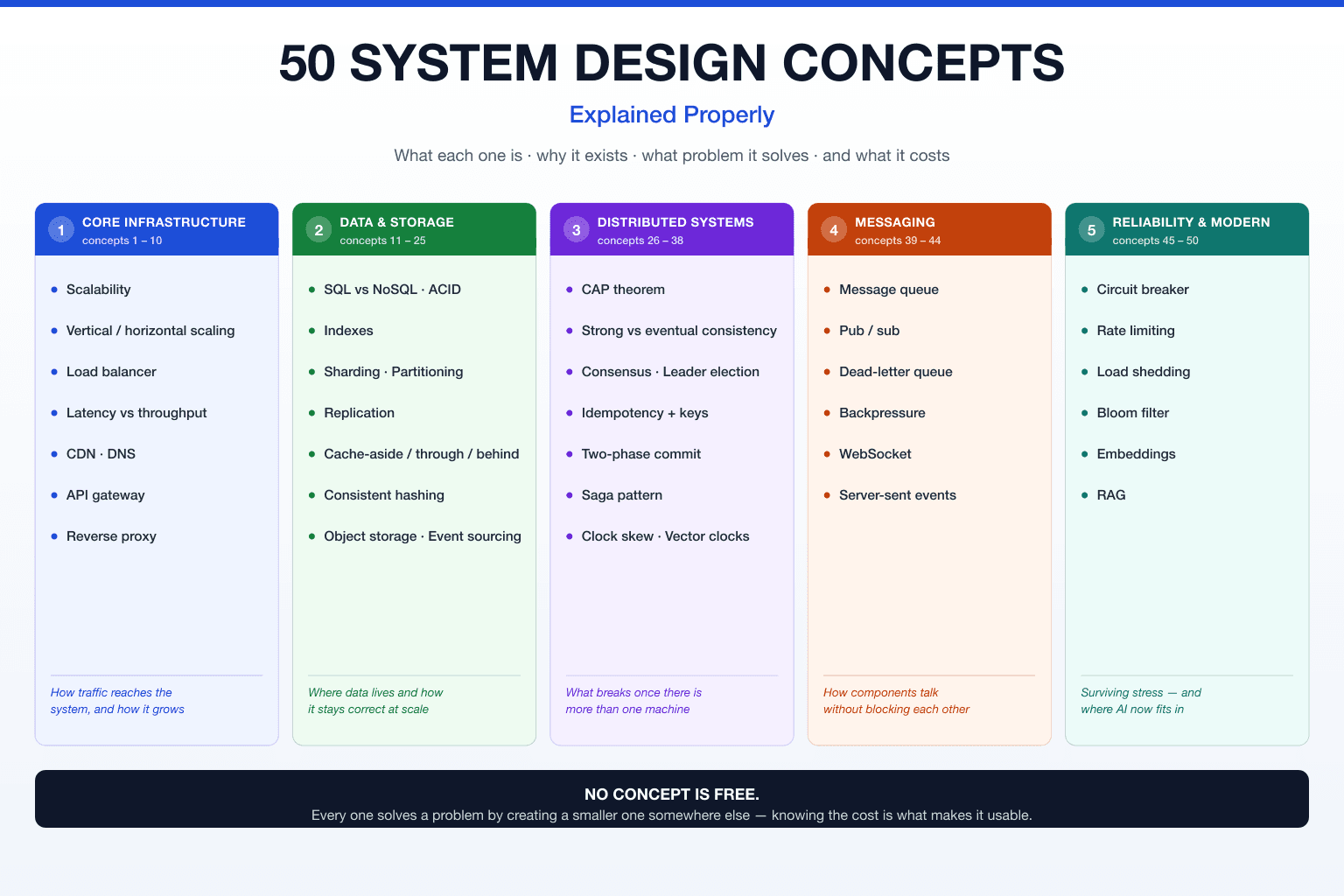
Open to everyone
No sign-up needed for any of this
Interactive demos
Editable code and visualisations that run in the page - change the input and watch what happens.
Three reading themes
Day, read, and night. Long articles should not have to be read at full contrast.
Search across everything
Find a pattern or a term without knowing which course it belongs to.
Contents for long reads
Every long article carries a table of contents that tracks where you are in it.
Reading is free. An account remembers you.
Every course and article stays open, with no sign-up and no paywall. An account adds the things that only work when the site knows who you are - your progress, your saved lessons, your questions, and a nudge when something new is published.
- Pick up where you left off
- Tick lessons off as you finish them. With 239 across ten courses, remembering where you stopped is the whole problem.
- Save anything for later
- Keep a lesson or article to come back to. Your saved list is private and follows you between devices.
- Ask questions
- Comment on any lesson. If something here was unclear, saying so is how it gets fixed.
- Know when something new lands
- A bell for what has been published since you last looked, and an email if you want one. Turn the email off whenever you like.
- Like what helped
- Tells me which pages are worth expanding, and which ones are not landing.
Google sign-in only. No password to choose, no email to confirm. Your name and photo come from your Google account and appear next to your comments. What you save and complete is private to you - nobody else can see it. Sign out at any time.
The site so far
- courses
- 24courses
- lessons and patterns
- 273lessons and patterns
- articles
- 19articles