From Console to Code: Building an Automated SQS-to-DynamoDB Pipeline with AWS SAM
Stop managing serverless resources manually. Learn how to export your AWS Console configurations into a professional AWS SAM project on macOS. This guide covers everything from local Lambda testing with Docker to one-click deployment and automated verification.
Published on 8 mar 2026
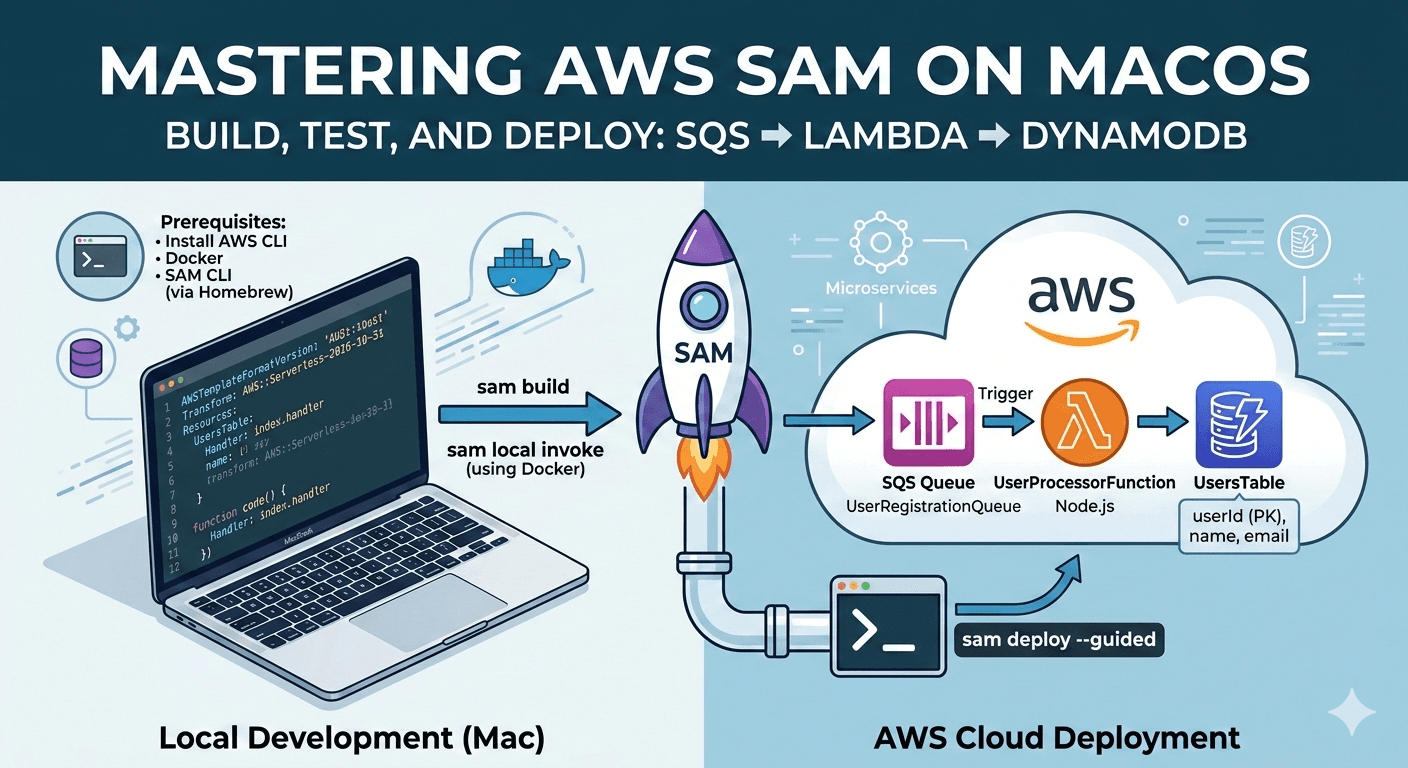
This article walks you through the journey of moving from "Click-Ops" (configuring things in the AWS Console) to true Infrastructure as Code (IaC) using AWS SAM. By the end, you’ll have a professional workflow on your Mac to build, test, and deploy a robust SQS-to-DynamoDB pipeline.
Part 1: Initial Cloud Setup (The "Click-Ops" Phase)
Before we automate, let's establish the foundation manually in the AWS Console to understand the components.
- Create DynamoDB: Go to the DynamoDB console and create a table named
UsersTable. Set the Partition Key asuserId(String). - Create SQS: Navigate to SQS and create a standard queue named
UserRegistrationQueue. - Create Lambda: Create a Node.js 18.x Lambda function.
- Permissions: In the Configuration > Permissions tab, click the Execution Role. Attach the
AmazonSQSReadOnlyAccessandAmazonDynamoDBFullAccessmanaged policies. - Trigger: In the Function overview, click Add Trigger, select SQS, and choose your
UserRegistrationQueue.
Part 2: Exporting to SAM
Now, let's export this configuration to move into local development.
- In the Lambda Console, click the Actions dropdown > Export function.
- Select Download AWS SAM file.
- Unzip this file into a folder on your Mac (e.g.,
sam-user-project). You now have thetemplate.yamlthat AWS auto-generated for you.
Part 3: Local Environment Setup (Mac)
If you haven't already, run these commands in your terminal to prepare your machine:
# Install Homebrew if you don't have it (https://brew.sh)

# Install AWS CLI and configure your credentials
brew install awscli
aws configure

# Install Docker (Required for sam local invoke)
brew install --cask docker

# Install AWS SAM CLI
brew install aws-sam-cli
Part 4: Project Structure
Inside your sam-user-project folder, organize your files like this:
1. package.json
Run npm init -y and update your package.json to include the required modules:
{
  "name": "sam-user-project",
  "version": "1.0.0",
  "type": "module",
  "dependencies": {
    "@aws-sdk/client-dynamodb": "^3.0.0",
    "@aws-sdk/lib-dynamodb": "^3.0.0",
    "uuid": "^9.0.0"
  }
}
Run npm install to download these.
2. index.mjs
Replace your code with the following:
import { DynamoDBClient } from '@aws-sdk/client-dynamodb';
import { DynamoDBDocumentClient, PutCommand } from '@aws-sdk/lib-dynamodb';
import { v4 as uuidv4 } from 'uuid';

const client = new DynamoDBClient({});
const ddb = DynamoDBDocumentClient.from(client);
const TABLE_NAME = 'UsersTable';

export const handler = async (event) => {
  console.log('Test SAM');
  console.log('SQS Event:', JSON.stringify(event));
  let lastuser;

  for (const record of event.Records) {
    const body = JSON.parse(record.body || '{}');
    const user = {
      userId: uuidv4(),
      name: body.name,
      email: body.email,
      createdAt: new Date().toISOString(),
    };
    try {
      await ddb.send(new PutCommand({ TableName: TABLE_NAME, Item: user }));
    } catch (e) {
      console.log(e);
    }
    lastuser = user;
  }
  return {
    statusCode: 200,
    body: JSON.stringify({ message: 'Users stored successfully', user: lastuser }),
  };
};
3. template.yaml
Open the file you downloaded. Ensure your CodeUri points to the current directory:
# This AWS SAM template has been generated from your function's configuration. If
# your function has one or more triggers, note that the AWS resources associated
# with these triggers aren't fully specified in this template and include
# placeholder values. Open this template in AWS Infrastructure Composer or your
# favorite IDE and modify it to specify a serverless application with other AWS
# resources.
AWSTemplateFormatVersion: '2010-09-09'
Transform: AWS::Serverless-2016-10-31
Description: An AWS Serverless Application Model template describing your function.
Resources:
  UsersManagement:
    Type: AWS::Serverless::Function
    Properties:
      CodeUri: ./src
      Description: ''
      MemorySize: 128
      Timeout: 3
      Handler: index.handler
      Runtime: nodejs24.x
      Architectures:
        - x86_64
      EphemeralStorage:
        Size: 512
      EventInvokeConfig:
        MaximumEventAgeInSeconds: 21600
        MaximumRetryAttempts: 2
      PackageType: Zip
      Policies:
        - Statement:
            - Effect: Allow
              Action:
                - sqs:ReceiveMessage
                - sqs:DeleteMessage
                - sqs:GetQueueAttributes
                - logs:CreateLogGroup
                - logs:CreateLogStream
                - logs:PutLogEvents
              Resource: '*'
            - Action:
                - dynamodb:*
                - dax:*
                - application-autoscaling:DeleteScalingPolicy
                - application-autoscaling:DeregisterScalableTarget
                - application-autoscaling:DescribeScalableTargets
                - application-autoscaling:DescribeScalingActivities
                - application-autoscaling:DescribeScalingPolicies
                - application-autoscaling:PutScalingPolicy
                - application-autoscaling:RegisterScalableTarget
                - cloudwatch:DeleteAlarms
                - cloudwatch:DescribeAlarmHistory
                - cloudwatch:DescribeAlarms
                - cloudwatch:DescribeAlarmsForMetric
                - cloudwatch:GetMetricStatistics
                - cloudwatch:ListMetrics
                - cloudwatch:PutMetricAlarm
                - cloudwatch:GetMetricData
                - datapipeline:ActivatePipeline
                - datapipeline:CreatePipeline
                - datapipeline:DeletePipeline
                - datapipeline:DescribeObjects
                - datapipeline:DescribePipelines
                - datapipeline:GetPipelineDefinition
                - datapipeline:ListPipelines
                - datapipeline:PutPipelineDefinition
                - datapipeline:QueryObjects
                - ec2:DescribeVpcs
                - ec2:DescribeSubnets
                - ec2:DescribeSecurityGroups
                - iam:GetRole
                - iam:ListRoles
                - kms:DescribeKey
                - kms:ListAliases
                - sns:CreateTopic
                - sns:DeleteTopic
                - sns:ListSubscriptions
                - sns:ListSubscriptionsByTopic
                - sns:ListTopics
                - sns:Subscribe
                - sns:Unsubscribe
                - sns:SetTopicAttributes
                - lambda:CreateFunction
                - lambda:ListFunctions
                - lambda:ListEventSourceMappings
                - lambda:CreateEventSourceMapping
                - lambda:DeleteEventSourceMapping
                - lambda:GetFunctionConfiguration
                - lambda:DeleteFunction
                - resource-groups:ListGroups
                - resource-groups:ListGroupResources
                - resource-groups:GetGroup
                - resource-groups:GetGroupQuery
                - resource-groups:DeleteGroup
                - resource-groups:CreateGroup
                - tag:GetResources
                - kinesis:ListStreams
                - kinesis:DescribeStream
                - kinesis:DescribeStreamSummary
              Effect: Allow
              Resource: '*'
            - Action:
                - cloudwatch:GetInsightRuleReport
              Effect: Allow
              Resource: arn:aws:cloudwatch:*:*:insight-rule/DynamoDBContributorInsights*
            - Action:
                - iam:PassRole
              Effect: Allow
              Resource: '*'
              Condition:
                StringLike:
                  iam:PassedToService:
                    - application-autoscaling.amazonaws.com
                    - application-autoscaling.amazonaws.com.cn
                    - dax.amazonaws.com
            - Effect: Allow
              Action:
                - iam:CreateServiceLinkedRole
              Resource: '*'
              Condition:
                StringEquals:
                  iam:AWSServiceName:
                    - replication.dynamodb.amazonaws.com
                    - dax.amazonaws.com
                    - dynamodb.application-autoscaling.amazonaws.com
                    - contributorinsights.dynamodb.amazonaws.com
                    - kinesisreplication.dynamodb.amazonaws.com
            - Effect: Allow
              Action:
                - logs:CreateLogGroup
              Resource: arn:aws:logs:us-east-1:390402572878:*
            - Effect: Allow
              Action:
                - logs:CreateLogStream
                - logs:PutLogEvents
              Resource:
                - >-
                  arn:aws:logs:us-east-1:390402572878:log-group:/aws/lambda/UsersManagement:*
      RecursiveLoop: Terminate
      SnapStart:
        ApplyOn: None
      Events:
        SQS1:
          Type: SQS
          Properties:
            Queue:
              Fn::GetAtt:
                - SQSQueue1
                - Arn
            BatchSize: 10
      RuntimeManagementConfig:
        UpdateRuntimeOn: Auto
  SQSQueue1:
    Type: AWS::SQS::Queue
    Properties:
      QueueName: SQSQueue1
      SqsManagedSseEnabled: true
Part 5: The Workflow (Build, Test, Deploy)
The Build
Every time you change code, you must build the project. This compiles your node_modules into a format AWS understands.
sam build
Local Testing
Generate a mock event to test your function locally:
sam local generate-event sqs receive-message --body '{"name": "Jane Doe", "email": "jane@example.com"}' > event.json
sam local invoke ProcessUserFunction -e event.json
How even.json file look like
{
  "Records": [
    {
      "messageId": "1",
      "body": "{\"name\":\"Chandu\",\"email\":\"chandu@test.com\"}"
    }
  ]
}
Deployment
Use the guided deployer to save your configuration into samconfig.toml:
sam deploy --guided
- Pro-tip: For ongoing development, use
sam sync --watch. It will automatically push your code changes to AWS as you save files, skipping the slow full deployment process.
Part 6: Final Verification
Once deployed, verify the end-to-end pipeline using the AWS CLI.
- Get your Queue URL:
aws sqs get-queue-url --queue-name UserRegistrationQueue - Push a test message:
aws sqs send-message --queue-url <YOUR_QUEUE_URL> --message-body '{"name": "Alice", "email": "alice@test.com"}' - Check DynamoDB:
aws dynamodb scan --table-name UsersTable
You should see your newly created user entry in the terminal output!
The "Complete-Test.sh" Automation Test Script
Create a file named test-pipeline.sh in your project root and paste the following:
#!/bin/bash

# 1. Configuration - Update these to match your setup
STACK_NAME="user-processor-stack"
QUEUE_NAME="UserRegistrationQueue"
TABLE_NAME="UsersTable"

echo "Starting End-to-End Test for $STACK_NAME..."

# 2. Get the Queue URL automatically
echo "🔍 Fetching Queue URL..."
QUEUE_URL=$(aws sqs get-queue-url --queue-name $QUEUE_NAME --query "QueueUrl" --output text)

if [ -z "$QUEUE_URL" ]; then
    echo "Error: Could not find Queue. Is it deployed?"
    exit 1
fi

# 3. Send a test message
echo "📨 Sending message to SQS..."
aws sqs send-message --queue-url "$QUEUE_URL" \
    --message-body '{"name": "Automated Test", "email": "auto@test.com"}'

echo "⏳ Waiting 5 seconds for Lambda to process..."
sleep 5

# 4. Verify the result in DynamoDB
echo "📊 Checking DynamoDB for the new user..."
aws dynamodb scan --table-name $TABLE_NAME \
    --query "Items[?email.S=='auto@test.com']" --output table

echo "Test Complete!"
How to use it:
- Give it permission to run:
chmod +x test-pipeline.sh - Execute the test:
./test-pipeline.sh
Pro-Tip: The .gitignore
Add a .gitignore file so we don't accidentally push their local environment to GitHub:
.aws-sam/
node_modules/
samconfig.toml
event.json
*.zip